The 2-Hour Fix Most Home Networks Are Missing: How to Segment Your Wi-Fi Like a Security Architect

Dek: Three federal advisories on router and IoT compromise landed in the last fourteen months. None of them use the word "segment."
The pattern I kept noticing

I read a lot of advisories for work. Not by choice, exactly; when you're the escalation point for security operations, government advisories are just part of the morning reading pile, sitting next to overnight attack telemetry and whatever fire someone else already tried to put out.
So over the last year, I noticed a pattern that had nothing to do with my day job and everything to do with the router sitting in my hallway closet.
In June 2025, the FBI put out an alert about the BADBOX 2.0 botnet, with millions of compromised consumer devices (TV streaming boxes, digital picture frames, even car infotainment units) being used as criminal proxy infrastructure. Its fix list: monitor your traffic, check your devices, don't sideload apps, patch your firmware.
In July 2026, the NSA, CISA, and eighteen international partner agencies published advisory AA26-194A, warning that Russia's FSB Center 16 was actively exploiting poorly configured routers across critical infrastructure. Its fix list: SNMPv3, disable Cisco Smart Install, block TFTP and SNMP at the edge, patch.
In March 2026, the FCC banned new imports of foreign-manufactured consumer routers outright, citing their role in the Volt Typhoon, Flax Typhoon, and Salt Typhoon campaigns against U.S. infrastructure.
Three advisories. Three different agencies, three different threat actors, fourteen months. Every single one describes some version of the same failure: a device on a home or small-office network gets popped, and from there it has a clean, unobstructed path to everything else plugged into that router.
None of them tells you to segment the network so a compromised smart plug can't talk to your laptop in the first place.
That's not a criticism of the advisories; they're written for a general audience, and patching/passwords are the lowest common denominator. But it's the gap I'd flag first if one of these networks came across my desk at work, and it's the cheapest gap to close. It took me about two hours on a Saturday. Here's exactly how.
What "flat network" actually means, and why your router ships that way
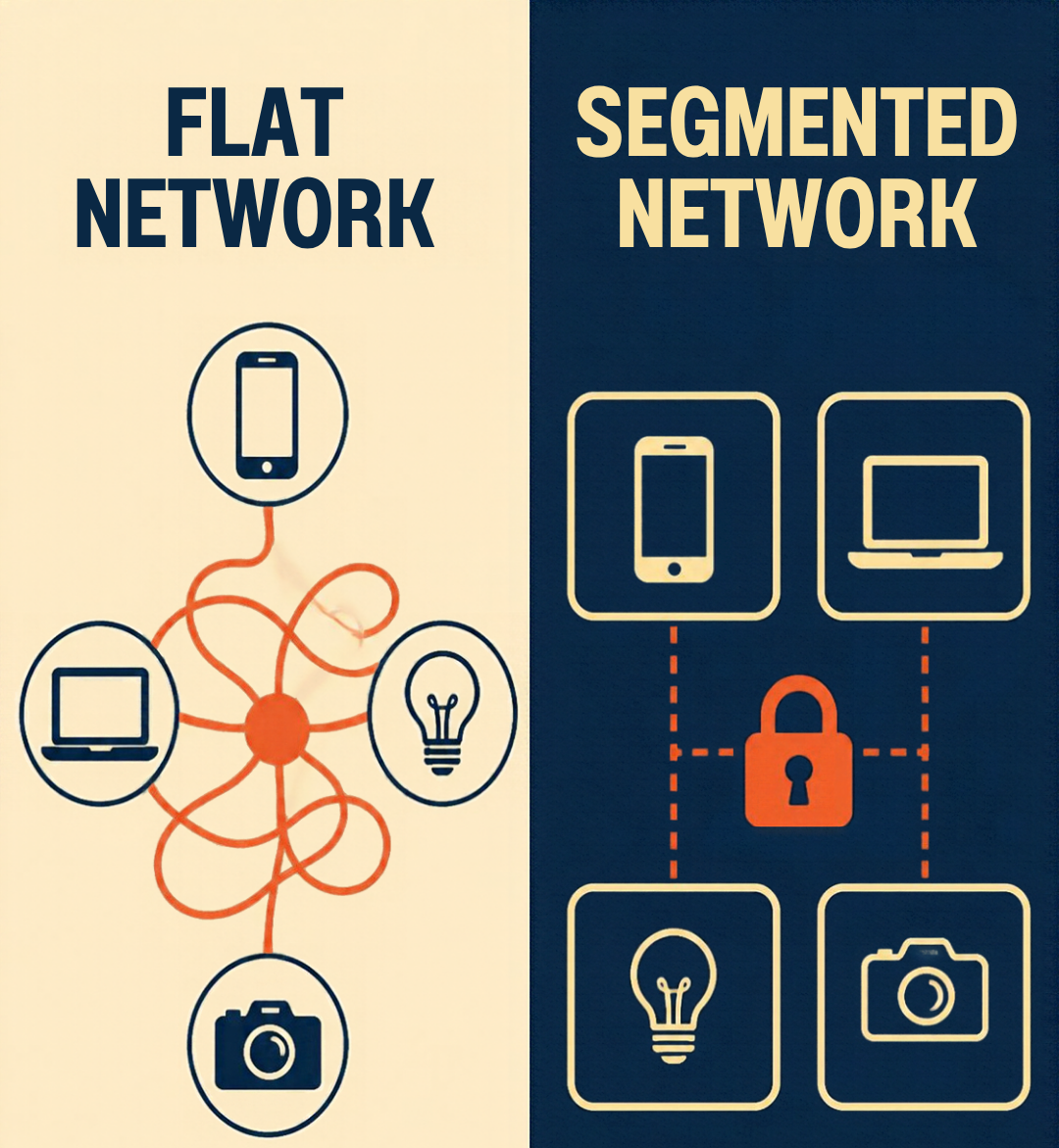
If you've never touched your router's advanced settings, every device on your Wi-Fi is almost certainly on one flat network. Your laptop, your partner's phone, the smart plug you bought during a Diwali sale, the doorbell camera, the guest's phone when they visit — all of it lives on the same subnet; all of it can see all of it.
"Flat network" just means there's no internal wall. Once a device is on the network, it can talk to any other device on the network by default. Nothing has to be exploited a second time — the attacker just walks over.
Routers ship this way because it's the zero-configuration option. Every consumer router since the concept existed has optimized for "plug it in, everything works," and segmentation is the opposite of that it requires you to decide, on purpose, which things get to talk to which other things.
This is the same principle behind why enterprises don't put customer-facing web servers on the same segment as their domain controllers. The home network version of that mistake is putting a $15 smart bulb running firmware nobody at that company has updated since 2022 on the same subnet as the laptop with your banking session open.
VLANs, in plain terms
A VLAN (Virtual Local Area Network) is a way to split one physical network into multiple logically separate ones, without running separate cables for each. Devices on VLAN 10 and devices on VLAN 20 can share the same switch and router hardware, but by default they can't see or reach each other—that has to be explicitly allowed.
The mechanism is a VLAN tag: a small marker (defined in the IEEE 802.1Q standard) added to network traffic that says "I belong to VLAN 10." Switches and access points that understand 802.1Q read that tag and keep the traffic separated accordingly. A port can be:
Untagged / access, meaning every device on it belongs to one specific VLAN and doesn't need to know VLANs exist (this is how you'll plug in most devices)
Tagged / trunk, meaning it can carry traffic for multiple VLANs at once (this is how your router, switch, and access points talk to each other)
Most home users have never needed this because most home routers either don't expose it or hide it three menus deep. That's changed a lot in the last few years — VLAN support is now standard on Ubiquiti UniFi, TP-Link Omada, and most OpenWrt-flashable hardware, and it's a fair bit more attainable than it used to be.
The segmentation model I run at home

I use four VLANs. This isn't the only right answer, but it's the minimum split I'd defend to a peer:
VLAN | Purpose | What lives here |
10 — Trusted | Full access, no restrictions | Laptops, phones, personal devices |
20 — IoT | Internet access only, no access to other VLANs | Smart plugs, bulbs, TVs, thermostats |
30 — Cameras/NVR | Isolated, no internet access at all | Security cameras, the NVR/recorder |
40 — Guest | Internet access only, isolated from everything | Visitors, kids' friends |
The cameras VLAN is the one people skip and shouldn't. Most consumer camera brands phone home constantly, and many have firmware CVEs involving remote code execution or credential exposure. There's no legitimate reason your camera feed needs to reach the open internet directly; route it through a local NVR or a VPN if you need remote viewing, and block the cameras from initiating outbound connections.
Show your work: configuring it end to end
This is the part that actually takes two hours, most of it spent double-checking rules rather than typing them.
Step 1 — Create the VLANs on your router/gateway. In a UniFi or Omada-style controller, this is a named object: VLAN ID, subnet, DHCP range. Example:
VLAN 10 (Trusted):    192.168.10.0/24   DHCP: .100-.200
VLAN 20 (IoT):        192.168.20.0/24   DHCP: .100-.200
VLAN 30 (Cameras):    192.168.30.0/24   DHCP: .100-.200
VLAN 40 (Guest):      192.168.40.0/24   DHCP: .100-.200
Step 2 — Tag your switch ports. Any port connecting router-to-switch or switch-to-access-point needs to be a trunk (tagged) port carrying all four VLANs. Any port with a single end device — say, the NVR — should be an access (untagged) port assigned to just that VLAN.
Port 1 (to router):        Trunk, tagged 10/20/30/40
Port 2 (to access point):  Trunk, tagged 10/20/30/40
Port 3 (to NVR):           Access, untagged, VLAN 30
Port 4 (to desktop):       Access, untagged, VLAN 10
Step 3 — Map SSIDs to VLANs on your access point. This is the step that makes it usable for non-technical household members: you're not asking anyone to configure VLANs on their phone; you're just giving them a different Wi-Fi network to join.
SSID "HomeNet"       → VLAN 10 (Trusted)
SSID "HomeNet-IoT"    → VLAN 20 (IoT)
SSID "HomeNet-Guest"  → VLAN 40 (Guest)
(Cameras are usually wired, so VLAN 30 typically doesn't need its own SSID.)
Step 4 — Write the inter-VLAN firewall rules. This step actually creates the isolation. VLANs alone only separate broadcast domains; they don't block routing between them unless you tell the firewall to. In pfSense/OpnSense-style syntax, on the IoT VLAN interface:
Rule 1: Block  | Source: IOT net       | Dest: Trusted net (192.168.10.0/24)
Rule 2: Block  | Source: IOT net       | Dest: Cameras net (192.168.30.0/24)
Rule 3: Block  | Source: IOT net       | Dest: Guest net    (192.168.40.0/24)
Rule 4: Allow  | Source: IOT net       | Dest: any (internet)
And on the Cameras VLAN interface, the more restrictive version:
Rule 1: Allow  | Source: Trusted net    | Dest: Cameras net (so you can view feeds)
Rule 2: Block  | Source: Cameras net    | Dest: any RFC1918 (no lateral movement)
Rule 3: Block  | Source: Cameras net    | Dest: any (no direct internet — force it through your NVR/VPN)
Rule order matters: block rules for lateral traffic should sit above the general "allow to internet" rule, since most firewalls process top-down and stop at the first match.
Proving it worked: don't trust the UI.
A green checkmark in your router's dashboard is not evidence. Test it the way you'd test any control before you sign off on it.
From a device on the IoT VLAN (a laptop temporarily joined to HomeNet-IoT works fine for this):
# Should fail / time out — trusted network shouldn't be reachable
ping 192.168.10.50

# Should return nothing — no hosts visible on the trusted subnet
nmap -sn 192.168.10.0/24

# Should succeed — IoT devices still need the internet
curl -I https://www.google.com
If the ping or nmap scan actually returns something, your inter-VLAN rule isn't doing what you think it's doing, usually because a rule is in the wrong order, or because you configured the block on the wrong interface (VLAN firewall rules apply to traffic entering an interface, which trips people up constantly).
Where this goes wrong
Three patterns I've seen in enterprise environments are the same root causes as in a testing lab in someone's living room:
The trunk port that isn't actually tagged. You configure four VLANs, wire everything up, and it doesn't isolate anything because the port between your switch and access point was left as an access port on the default VLAN, so every SSID ends up on the same network regardless of what you configured upstream.
IoT devices that need to talk to each other, but you blocked it all. Smart home ecosystems (especially Matter/Thread-based ones) sometimes need local device-to-device discovery. Blanket-blocking all IoT-to-IoT traffic instead of just IoT-to-trusted will break your lights, and then you'll "temporarily" flatten the whole thing to fix it and never revisit it. Scope the block to what actually needs blocking.
DNS as the leak nobody checks. You lock down IP traffic between VLANs but leave every VLAN pointed at the same internal DNS resolver on your trusted network. That's still a path in. Give each VLAN its own resolver, or explicitly allow only DNS (port 53) through and nothing else.
Why this matters in India
Every advisory I opened this post with was written for American and European readers. Reading them from Bengaluru, it's tempting to file them under "someone else's problem." I'd argue the opposite, for three reasons.
India already treats home devices as an infection surface. CERT-In runs the Cyber Swachhta Kendra, a botnet-tracking service whose remit explicitly includes home routers alongside phones and computers. By December 2025, it reported 89.55 lakh downloads of its botnet-removal tools. My read: a national cleanup program at that scale only exists because infected home devices are common here. But cleanup is what you do after the fact. Segmentation is what you can do before it.
New cameras are getting safer. The ones already on your wall aren't. From 1 April 2026, only CCTV cameras that meet MeitY's Essential Requirements (secure firmware, encrypted communication, authentication controls, tested through STQC) can be sold in India. That's good policy. But it governs what's sold from here on, not what's already installed in homes, shops, and PGs. Those cameras are still running whatever firmware they shipped with. That's why the cameras VLAN from earlier matters even more here.
A note on sourcing: trade publications disagree on the CCTV dates. One cites April 2025. The most consistent timeline I found is Essential Requirements notified in the Gazette on 9 April 2024, the relaxation withdrawn by an Office Memorandum dated 16 January 2026, and enforcement from 1 April 2026. Check MeitY's notices directly before you quote a date.
The FCC ban doesn't reach you. The botnet economics do. The FCC ban is a US import-authorization rule, so nothing changes on Indian shelves. On BADBOX 2.0, HUMAN Security's published breakdown names Brazil (over a third of observed devices), the US, Mexico, Argentina, and Colombia. India isn't called out, and I couldn't find India-specific numbers. That's a data gap, not an all-clear: the same research saw associated traffic from 222 countries and territories.
The practical catch: your router is probably your ISP's. In most homes, the gateway is whatever the installer left behind, and ISP gateways often don't expose VLAN settings. Your options, in order of preference:
Check whether your ISP allows bridge mode, then put your own VLAN-capable router or access point behind it.
If you can't, put every IoT device on the gateway's guest network. Guest isolation usually gives you less control than VLANs plus firewall rules, but it's far better than one flat network.
Whichever you pick, run the same ping/nmap test from earlier. Don't assume the guest network blocks what you think it blocks.
The 2-hour version: do this on a weekend

If you do nothing else after reading this, do these five things:
Inventory what's actually on your network. Most routers show connected devices under "clients" or "connected devices"; you will find things you forgot existed.
At minimum, stand up two VLANs: Trusted and IoT. Cameras and Guest can come later.
Move every device that isn't a laptop, phone, or desktop onto the IoT VLAN.
Write one firewall rule: block IoT → Trusted. That single rule closes the exact gap in all three advisories above.
Test it with ping/nmap, not the dashboard.
What's next if you want to go further
Segmentation stops lateral movement, but it doesn't tell you when something on your network starts behaving badly in the first place; that's a monitoring and detection problem, which is a different two-hour project (think a lightweight IDS like Suricata on your router, or even just reviewing DHCP/DNS logs weekly). That's worth its own post, and I'll get to it.
For now: check your router's client list. If everything is on one subnet, you already know what to do this weekend.
Sources
Note on sourcing confidence: the FBI, CISA/NSA, and FCC documents above are primary government sources and I've verified their content directly. The "21 connected devices per household" figure is the most recent widely cited number I could confirm, but its underlying data is from 202. I'm flagging that rather than presenting it as current-year data, since a fresher figure doesn't appear to be publicly available yet.


Comments